

Learn how community colleges are replacing fragmented A/V setups with one secure platform designed to scale across nursing, counseling, allied health, CTE programs, and more.
Download a copy of this guide to take with you!

From campus to campus across the country, community college students are practicing clinical procedures, refining technical skills, participating in simulations, and receiving hybrid instruction thanks to audio/video capture technology.
With the ability to record demonstrations, simulations, and skills assessments, audio/video (A/V) capture technology offers community colleges the ability to create a consistent and robust learning experience while reducing the challenges of delivering hands-on learning at scale.
A/V capture technology for community colleges expands the tools instructors and program administrators are using to meet increasing enrollment demand without compromising instruction quality.
So what's actually driving the demand? In most cases, the answer comes back to workforce shortages playing out across healthcare, the trades, and other sectors where community colleges serve as essential workforce partners.
Workforce Demand is Driving Rapid Program Growth
Community colleges traditionally focus on career and technical education that prepares students for entry into a skill-based workforce.
Recent statistics show that labor shortages are driving the need for expanded enrollment:
- The demand for licensed practical and vocational nurses (LPNs) is expected to grow faster than the supply until at least 2038.
- Only three of five dentists report having enough dental hygienists on staff, while reporting similar shortages for dental assistants and administrative staff.
- Fewer than 10% of diagnostic imaging programs are operating at full enrollment capacity post-COVID, largely due to faculty and clinician site shortages, despite demand outpacing available workers.
In response, federal and state governments are continuing to expand funding for CTE and workforce development through programs like Perkins V. Many community colleges are also simultaneously allocating funding for new building construction or faculty upgrades to support program growth on their campuses.
Together, these factors create a timely window to modernize A/V capture technology for community colleges, expanding program capacity without the need to rebuild infrastructure.
Campuses are Expanding Faster than Systems Can Keep Up
Many community colleges have expanded their programs to address overall workforce development and allied-health employment needs. Enrollment growth supports more students per cohort and addresses workforce needs by preparing new graduates.
But the technology supporting those programs often hasn't grown with them, resulting in patchwork technology stacks to support video capture, observation, and learning.
Many legacy audio/video capture and observation systems were built for a single room or a single program, and they don't extend cleanly when a college expands across departments, buildings, or campuses.
Multi-building campuses with multiple workforce or allied-health programs feel this strain most acutely because no single department's tools were designed to scale across the institution.
A single audio/video capture technology platform that works across the entire campus ecosystem reduces this strain. Each new program extends a system that's already running rather than adding a new one to install, train staff on, and maintain.
Most community colleges adopt A/V capture in one program first. Adoption spreads once other programs see the value and ease of a single A/V capture technology platform.
|
Use Case |
Used For |
|
Used to simulate clinical settings |
|
|
Secure recording and review of sensitive student interactions |
|
|
Clinical skills review and supervision |
|
|
Skills assessment and faculty observation |
|
|
Programs supported by Perkins V and workforce funding |
|
|
Standardized evaluation across instructors and cohorts |
|
|
Observation, recording, and review for ongoing professional learning |
What ties these use cases together is that they don't have to run on separate systems. The same A/V capture solution can be used in the simulation lab, the counseling suite, and the CTE skills lab.
Getting the infrastructure right early means that every new program adopting A/V capture technology extends an existing system rather than launching a fresh project from scratch.
Learn how video capture technology is being integrated at Memorial Hermann Institute for Nursing Excellence in our blog post, “How Video Is Transforming Nursing Education and the Future Healthcare Workforce.”
Most community colleges didn't start with a campus-wide video capture strategy. Instead, many community college programs integrated tools as they grew: one cart in the nursing simulation lab, another setup in counseling, maybe a recording solution someone bought for the A/V department years ago.
A technological patchwork will work in the short term, but once enrollment grows or another building comes online, the operational limitation can start to surface.
Here are some common problems that occur at community colleges with piecemeal technology integration.
Too Many Disconnected Tools Across Programs
Many community college programs run on disparate technological platforms that cannot communicate with one another. These scattered video and A/V capture tools are often stitched together, requiring an A/V integrator to synchronize them. Every piece has its own support contract, training requirements, and an annual renewal requirement.
Manual Observation and Review Can’t Scale
Though manual observation works in a one-room setup, this model breaks down when there are more sessions required than the faculty and physical classroom can accommodate. Limited observation space can lead to scheduling waitlists, delayed reviews, and issues with timely student evaluations.
Limited IT Resources Slow Down Progress
Community college IT departments often exist on lean budgets with a maxed-out team, yet still keep campus technology running. Platforms and technology that don’t require a deep IT lift are appealing fixes when resources are stretched thin, even if they act as a patch rather than a true campus-wide solution.
Inconsistent Workflows Across Departments
When campus programs rely on different video capture systems, they also create their own workflows. Without a shared standard, this environment creates inconsistencies and gaps, making it hard to maintain shared standards or compare outcomes. Data can also live in separate tools, which makes clean audit trails and consistent reporting difficult and/or time-consuming.
FERPA, Access Control, and Student Privacy Issues
As public institutions, community colleges that store recorded data must take student privacy, accessibility, data governance, and broader compliance obligations seriously. If recorded sessions live across stitched-together systems with their own permission settings and retention rules, security gaps can occur, exposing the system to unexpected access, data breaches, and compliance issues.
With complex and disparate video capture technology in use on a campus, the problem is rarely solved by adding another tool. Rather, creating an integration plan for a comprehensive, campus-wide audio/video capture system will provide program access consistently and securely.
There are several key advantages when a campus chooses to implement a single, holistic A/V observation and recording platform program-wide.
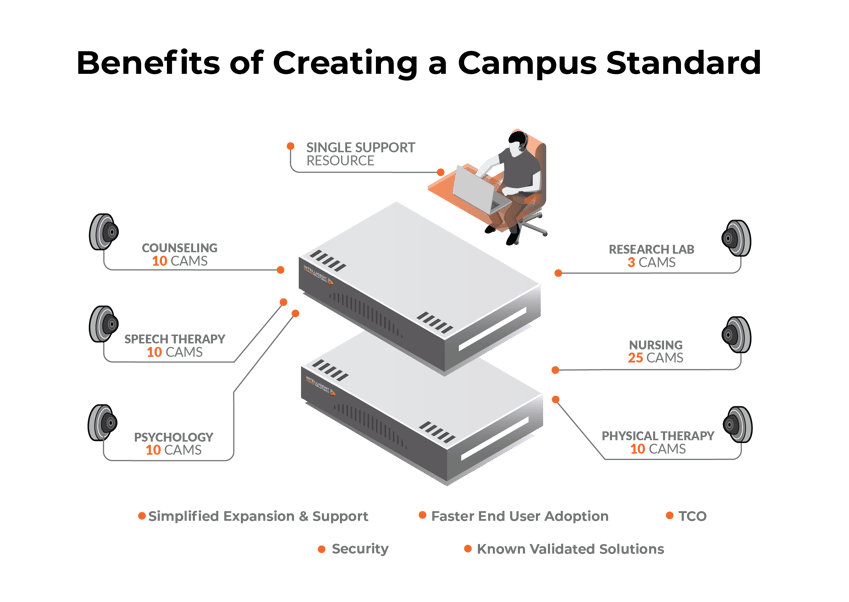
A single video capture system on campus can:
- Help demonstrate universal compliance with accreditation standards, streamlining the evidence required in seeking and maintaining accreditation.
- Seamlessly integrate with existing networks, ensuring minimal disruption and optimal performance, while providing flexibility in recording options.
- Adapt to campus-wide use cases, supporting repeatable processes for your IT department, central platform management, and less hardware to track, resulting in improved overall technology performance.
- Provide the safe and secure platform community colleges need to meet privacy and other regulatory requirements.
- Better adapt to future-forward technologies and the advantages they offer, including cloud storage, reduced bandwidth requirements on networks, remote user access and the increasing integration of mobile options.
A great way to introduce the concept of a single, holistic A/V observation and recording platform is to use a five-step approach.
What follows is the planning framework for community colleges to use as they move from one-room installs and existing patchwork technology stacks to a campus-wide platform. This approach works whether you're starting from scratch in a new building or bringing multiple existing programs onto a single system.
Step 1: Map Your Programs and Use Cases
Compile a list of every program at your college that currently uses audio/video capture today or could realistically integrate it in the future. Consider the obvious departments like nursing and CTE, as well as programs or areas that may be unique to your campus.
For each program, note:
- What rooms the program uses
- What A/V equipment is already in place
- How observation, recording, and instruction currently occur
Pay attention to which systems are owned by central IT and which are owned by individual departments, because the distinction usually predicts where political and budget conversations might occur.
Once the list is compiled, select a program to anchor the rollout. The best program candidates typically have strong faculty leadership, clear use cases, and a near-term need. Then identify two or three more programs to layer on as funding and timing allow in subsequent phases.
Step 2: Define Requirements for Security, Scale, and Workflows
Creating a formal requirement list will provide more clarity in this process. Start with FERPA, access control, retention, and permissions as they apply to each use case.
You will want to discover:
- Who needs to view what
- How long recordings stay accessible
- Who can download recordings
- Who can share recordings
Then map user roles for each program. Faculty, students, supervisors, and outside observers may all need different levels of access, and those levels will likely vary across programs.
Finally, document the full workflow for each program from capture through review, including:
- How does a recording start
- Where is it stored
- Who tags it, reviews it, and signs off on it
- What evaluations or other assessment rubrics can be documented alongside videos
- Who follows up with the student
At this point, you will have a complete inventory of your campus’s classroom recording technology and its use.
As a bonus, this exercise may also help surface gaps in access, permissions, and regulatory compliance.
Step 3: Plan Facilities and A/V Integration
New construction offers the cleanest installation path for new audio/video capture technology for community colleges. New construction lets you plan cabling, network, room layout, and storage from the ground up, and it's the best opportunity to standardize observation and recording across an entire building.
Retrofitting existing rooms can make integrating new A/V capture technology for technical colleges more complex. But by bringing your A/V integrator into the conversation early, well before the install starts, you can save time and money. IVS offers complete A/V evaluation, implementation, and installation services but we also work through an established A/V partner network, so you don't have to find an integrator on your own if you don't already have one in place. Talk with us to start planning your A/V solution.
In addition to infrastructure planning, you will also want to consider data storage, especially as the use of cloud adoption is rising among community colleges. Plenty of campuses still prefer on-prem for compliance or cost reasons. Either path can work, but the decision needs to happen early enough to influence procurement and possible storage bandwidth on-site at the campus.
Step 4: Align Budget and Funding Sources
Most community colleges can't fund a campus-wide video capture rollout from a single budget line, and this affects almost every meaningful technology investment in higher ed. The key to successfully funding a campus-wide, community college audio/video capture program is to understand how budgeting works and how grant funding flows to your community or technical college.
There are typically two types of budgets in place at a community college:
- Annual operating budgets are usually fixed and don't leave much room for new initiatives mid-year. There will not likely be funding available for a new project in your annual operating budget unless it is specifically allocated and approved.
- Capital improvement budgets are designed for new investments, especially if the project is tied to new construction or a major renovation. Workforce-aligned capital-improvement funding sources tend to be the most flexible, particularly for programs like nursing, allied health, EMS, and CTE.
Federal and state-based grant funds often support capital improvement budgets. Perkins V is the largest of these grant sources for CTE programs and flows through state formula grants.
Beyond Perkins V, look at workforce development grants, HRSA funding for nursing and allied health, foundation gifts tied to specific programs, donor support, and any state-level grants your education agency administers.
Most successful funding strategies combine two or three of these sources rather than relying on any one.
For a deeper breakdown of available funding sources for community colleges, including which programs qualify and how to apply, see our Community College Grant Funding Resource.
Step 5: Build a Phased Rollout
A single-step A/V capture technology platform launch usually comes with a high price tag, so a phased rollout is a great way to pitch a video capture project to your campus.
Start with one program, likely the one you identified as your anchor program in Step 1. Your anchor will provide a real proof point on campus, let you refine workflows, and build internal momentum before the next phase has the funding to come online.
Expansion into the next phase will be built on your locked-down role-based access, retention policies, and workflow standards. The temptation is to handle roll-outs on a case-by-case basis as each new program joins, but that's how inconsistency creeps back in. Set the standard once and apply it across new programs.
With a phased rollout, your planning will evolve from short-term integration to a more comprehensive, longer-term plan. You will want to consider which buildings should come next, which campuses could expand later, and what the rollout will look like over the next three to five years.
Your goal is for the chosen A/V capture technology platform to become the standard your college runs and builds on, not just another tool a singular department happens to use.
With a planning framework in place, the next set of questions is practical:
-
Who's making the decisions?
-
Where does the money come from?
-
What does the compliance picture look like?
Each community college A/V capture project has three important elements: the people involved, the money behind the project, and the compliance environment around it. The details of these elements shape how the rollout actually plays out.
Is your community college located in a rural area? Read our blog post, “CMS's $50B Rural Health Transformation Program: What Applicants Need to Know,” to learn more about the funding available through the Rural Health Transformation (RHT) Program.
Who Is Involved In The Decision
A faculty champion or program director usually surfaces the need for comprehensive audio/video capture technology first, often after running into the limits of their current setup or seeing what a peer institution has built.
From there, the conversation typically expands to include several other important voices:
- Once a proposed project touches multiple programs or becomes a strategic facility decision, deans and provosts will get involved.
- IT must weigh in on integration, security, and ongoing support.
- Facilities and capital project teams will shape the physical install.
- Procurement will run the RFP or competitive bid.
- Finance will sign off on the funding plan.
There can easily be hundreds of people who influence, support, or block a purchase decision across a single community college campus, and their collective participation will vary.
Procurement Paths and Timelines
The standard community college procurement process often includes multiple required steps, and thus, it will add time to your project. Decision-making will start distributed and become centralized as the project moves forward.
A typical strategic project can take six to 18 months from the first conversation to a signed contract. Smaller departmental projects can move faster, but anything involving multiple programs, capital funds, or new construction usually requires a longer timeline.
There is one other timing complication to keep in mind: Capital, grant, and workforce funding cycles rarely line up with each other. The need to accommodate multiple funding cycles is another reason why phased rollouts are often a good approach.
FERPA, Retention, and Policy Alignment
FERPA requirements will sharpen decisions regarding access, storage, and retention within the video capture system. VALT integrates FERPA compliance, retention rules, and audit-ready logs into its core architecture, ensuring these capabilities are inherent system functions rather than retroactive additions.
As a best practice, we recommend baking in appropriate access control, secure storage, and policy-aligned retention into the platform from day one rather than bolting them on after a deployment. Retrofitting compliance is harder and more expensive than building it in.
Additionally, you will want to review your institution’s Internal governance and records-management requirements regarding retention schedules and applicable video-specific policies.
With the planning and policy work in place, the question now becomes what software actually provides what community colleges need in an A/V capture platform.
IVS designed VALT: Video Audio Learning Tool as a cost-effective, scalable platform for capturing, managing, streaming, observing, and searching for audio/video content. As a single-platform A/V technology, the VALT architecture is ideal for institutions running several programs across multiple rooms or buildings.
VALT For Multi-program Campuses
With VALT, recording, live observation, annotation, and review all live in one place, so you're not paying for and supporting separate tools that mostly do the same thing. Having a single tool that provides appropriate access for faculty, students, and the IT department increases efficiency and keeps programs running smoothly. Role-based control is ideal for campuses with different user levels, and having it built in natively, including LDAP integrations, eliminates the need for a campus IT department to script custom permissions for each program.
VALT was designed to scale beyond a single lab or classroom. Operating on a unified network infrastructure, VALT seamlessly extends across multiple rooms, programs, buildings, and even campuses, enabling IT departments to efficiently phase in expansions and maintain security.
Implementation Services and Integrator Partnerships
True implementation means long-term partnership, not just hardware setup, especially when community colleges are applying our technology to multiple programs on campus or have progressed to multi-campus projects.
We support facility and project planning from early design conversations through go-live, which matters most during new construction, major renovations, or lab upgrades, where decisions about layout, cabling, and room design need to happen well before equipment arrives.
Once the project moves into installation, IVS handles configuration, training, and ongoing support so the internal IT team isn't carrying the project alone. This support matters at community colleges, where IT services can be stretched thin.
For the A/V side of the work, IVS partners with an established network of A/V integrators. If you already have an integrator relationship, IVS works alongside them. If you don't, we can introduce one with relevant, local experience.
One Vendor, One Point of Accountability
Community colleges that select one vendor for their video capture technology avoid the issues caused when blended technology stacks come together: endless tickets. The recording vendor blames the A/V integrator, the A/V integrator blames the storage provider, and the original problem stays unsolved while everyone files tickets.
Using one vendor that provides a single platform means only one team is accountable for problem resolution. Implementation, training, ongoing support, and product updates all run through IVS. Having one team means problem resolution can happen faster than what typically happens in a stitched-together environment. IVS has a 96% first call resolution rate.
Let’s take a look at a real-life application of IVS VALT A/V capture technology on a community college campus. The proof of any platform is what it actually delivers to students and faculty and the positive outcomes it creates.
1 Unified approach to video capture at Southeast Community College
The Challenge Before IVS
Southeast Community College opened a new health sciences facility designed to house 18 high-demand health science programs. The goal was to bring previously siloed programs together in a realistic, collaborative environment that better reflected the conditions students would face in clinical settings. The plan included the integration of A/V capture technology easy enough for 80 to 90 faculty members and hundreds of students to use without significant training, and compelling enough that faculty would consistently use it in their classrooms.
The IVS Approach
IVS got involved a year before the building opened. Early involvement helped to shape decisions about camera placement, room configuration, and how VALT technology could map to the specific needs of each program. Once implementation was underway, the IVS team worked closely with the college's IT department to complete that effort and provide continued support.
The Outcome
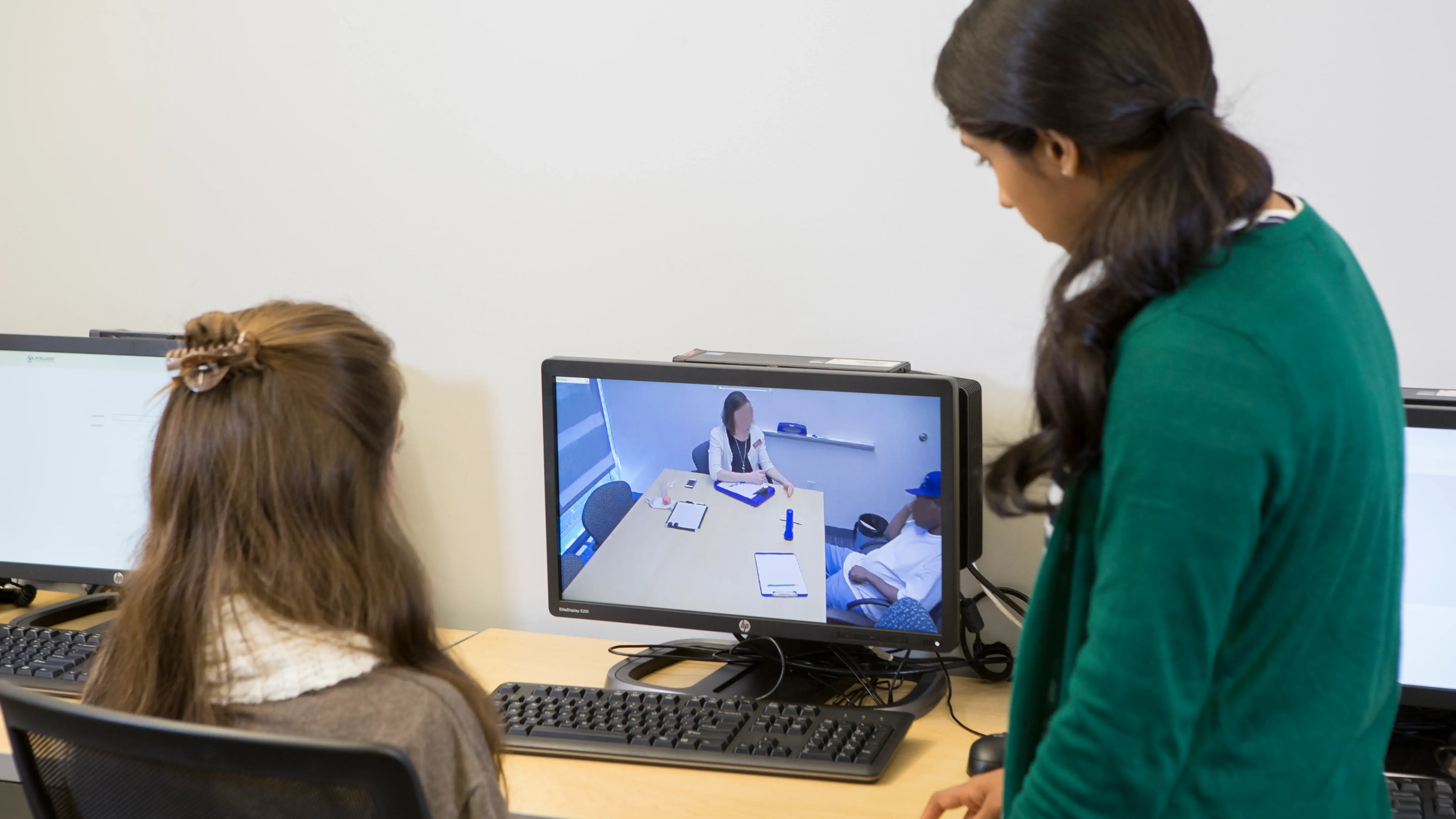
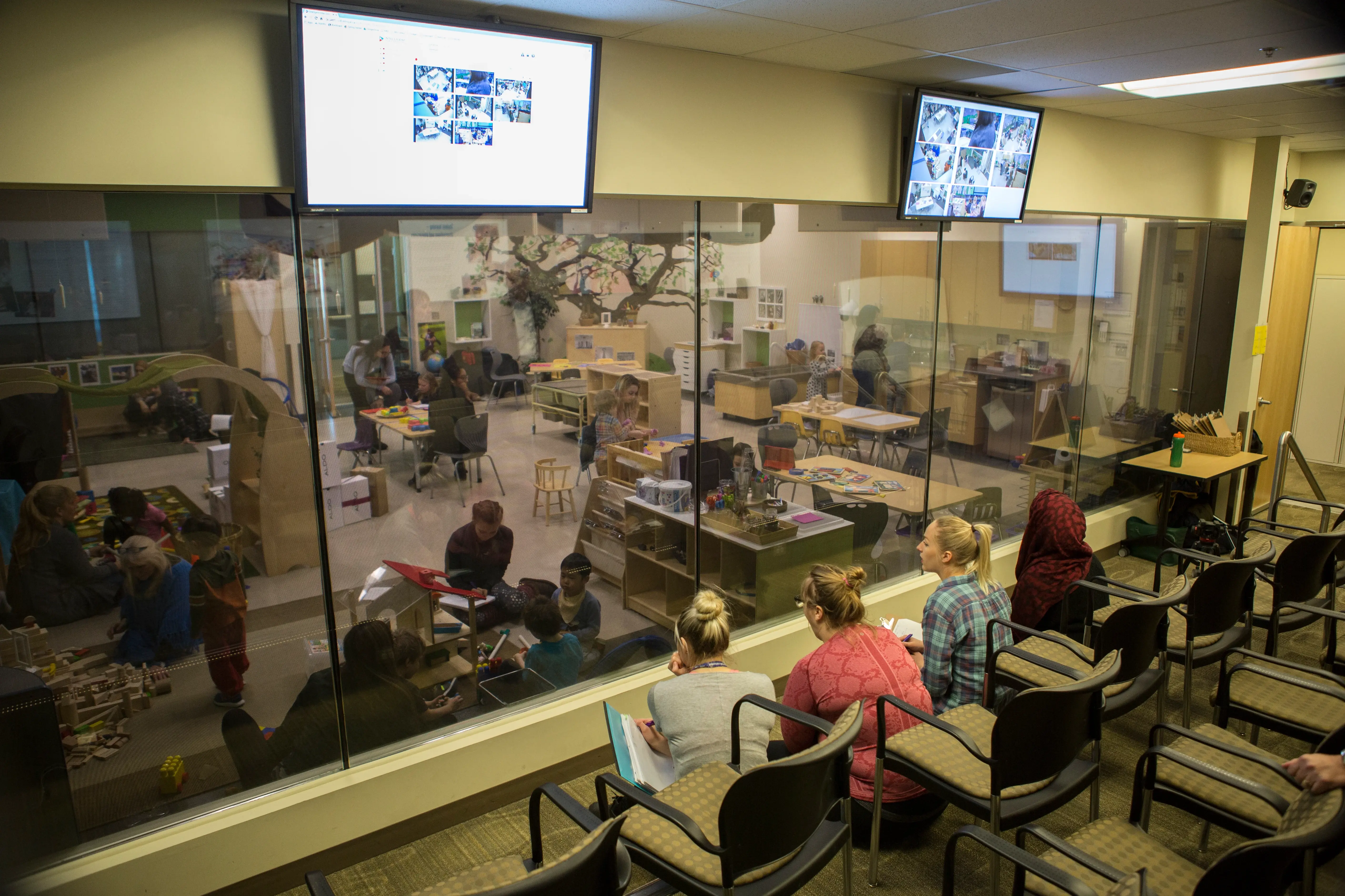
Using VALT, the A/V recordings are used for student self-reflection, skills assessment, and faculty review. Instructors can flag sections of a video to send home for student review. Faculty also use recordings to demonstrate procedures, which has cut down on repeat demonstrations and freed up more time for one-on-one instruction. VALT has become a platform students and faculty want to use, and the college says the deployment has created opportunities that aren’t happening at peer institutions.
Ready to Plan Video Capture for Your Community College?
Whether you're starting with one nursing simulation lab or planning a campus-wide rollout across multiple buildings, we'd be glad to help you map the path forward.
Talk to an IVS specialist to walk through your programs, funding timeline, and rollout priorities.
Download the Community College Grant Navigation Guide for a deeper look at funding opportunities at the community college/technical college level. Finally, we encourage you to request a VALT demo to see the platform in action across the use cases that matter most to your college.
Q. What is audio/video capture used for at community colleges?
Community colleges use audio/video capture to record, observe, and review student performance in simulation, clinical skills, labs and observational learning environments.
Q. What are the most common applications for audio/video capture at community colleges?
The most common applications include nursing and allied health simulation, behavioral sciences training, speech-language pathology, CTE/workforce skills training, faculty observation, and skills assessment.
Q. How does VALT support FERPA and student privacy requirements?
VALT supports FERPA compliance through layered access control. Role-based permissions and configurable retention rules govern every recording, so users only see what their role allows. Access logs provide an audit trail for sensitive sessions like counseling or clinical review.
Q. Can VALT scale from one lab to a full community college campus?
Yes, VALT scales from a single observation room to a full multi-building, multi-campus deployment without rebuilding the system at each step. Many community colleges start with a flagship program and expand to additional departments as funding, needs and facilities allow.
Q. How does IVS work with existing A/V integrators?
IVS partners with A/V integrators rather than competing with them. IVS provides the A/V capture and observation software while your integrator handles the room hardware and infrastructure. IVS can introduce qualified integrators if you don't already have one engaged.
Q. How does VALT integrate with SIS, LMS, or scheduling tools?
VALT integrates with the systems community colleges already run — SIS, LMS, scheduling, and A/V — and supports single sign-on and automated user provisioning where available. Custom integrations for department-specific lab or simulation tools can be scoped during implementation.