

Structed Feedback. Better Results
Our suite of feedback tools is designed to provide granular, actionable insights for both instructors and trainees.
Comments
Comments can be added during live observation or post-session review, and are automatically timestamped to the exact moment in the video.
Quick Markers
Quick Markers enable educators and observers to capture feedback instantly without typing custom comments.
Duration Markers
Duration Markers allow instructors or researchers to highlight extended segments of a recording, capturing moments where a single timestamp isn’t sufficient.
Transform Training and Research with Meaningful Tools
Use VALT's powerful yet simple feedback capabilities, whether you are training students, providing assessments, or gathering insights in research, to give reflective, constructive, and collaborative feedback at specific moments. These tools provide timestamped markers that highlight key moments while providing a way to quickly and effectively find what you need.
Comments
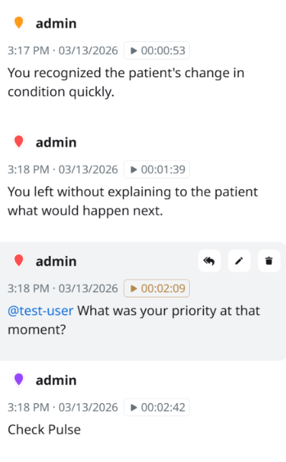
Comments can be added during live observation or post-session review, and are automatically timestamped to the exact moment in the video. They appear in a left-hand feed in chronological order, clearly identifying the user who made each comment. Color-coding helps quickly distinguish between users or comment types. Specific users can be tagged using “@”, and replies can be threaded directly under each comment for organized discussion.
Quick Markers
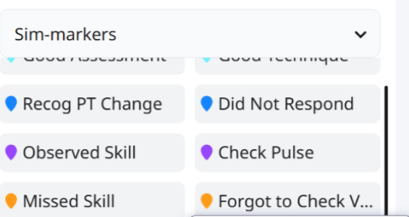
Quick Markers enable educators and observers to capture feedback instantly without typing custom comments. These markers can be tailored to your program, focusing on the most relevant or frequently observed behaviors. Each marker is timestamped, searchable, and clickable, allowing users to quickly revisit specific moments for review, self-reflection, or documentation.
Markers can also be color-coded to highlight trends or areas for improvement. Beyond feedback, they serve as a structured assessment and reporting tool by tracking how often specific markers are used.
For example, a nursing educator can use a “Missed Vitals” marker to quickly document and quantify how often a student overlooks checking vitals.
Duration Markers
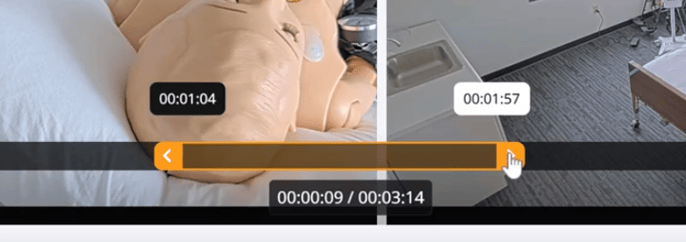
Duration Markers allow instructors or researchers to highlight extended segments of a recording, capturing moments where a single timestamp isn’t sufficient. These markers define a clear start and end point, making it easier to review, reflect on, and share longer interactions.
Marked segments appear in both the comment feed and video timeline, and can be clipped for easy sharing. This is especially useful for evaluating multi-step activities or workflows.
For example, an instructor can mark the full duration of a student group performing a series of skills from start to finish for more comprehensive assessment.
See for Yourself Why the Difference Is Clear
Get a demo of VALT to discover how you can harness the power of video without technical or security headaches.
